

Introduction to AI Employees
MakerClaw is MakersFuel's flagship feature: AI-powered employees that work 24/7 to automate your business tasks. Each employee runs in an isolated container, has its own workspace, and can be customized with specific skills, tools, and communication channels.
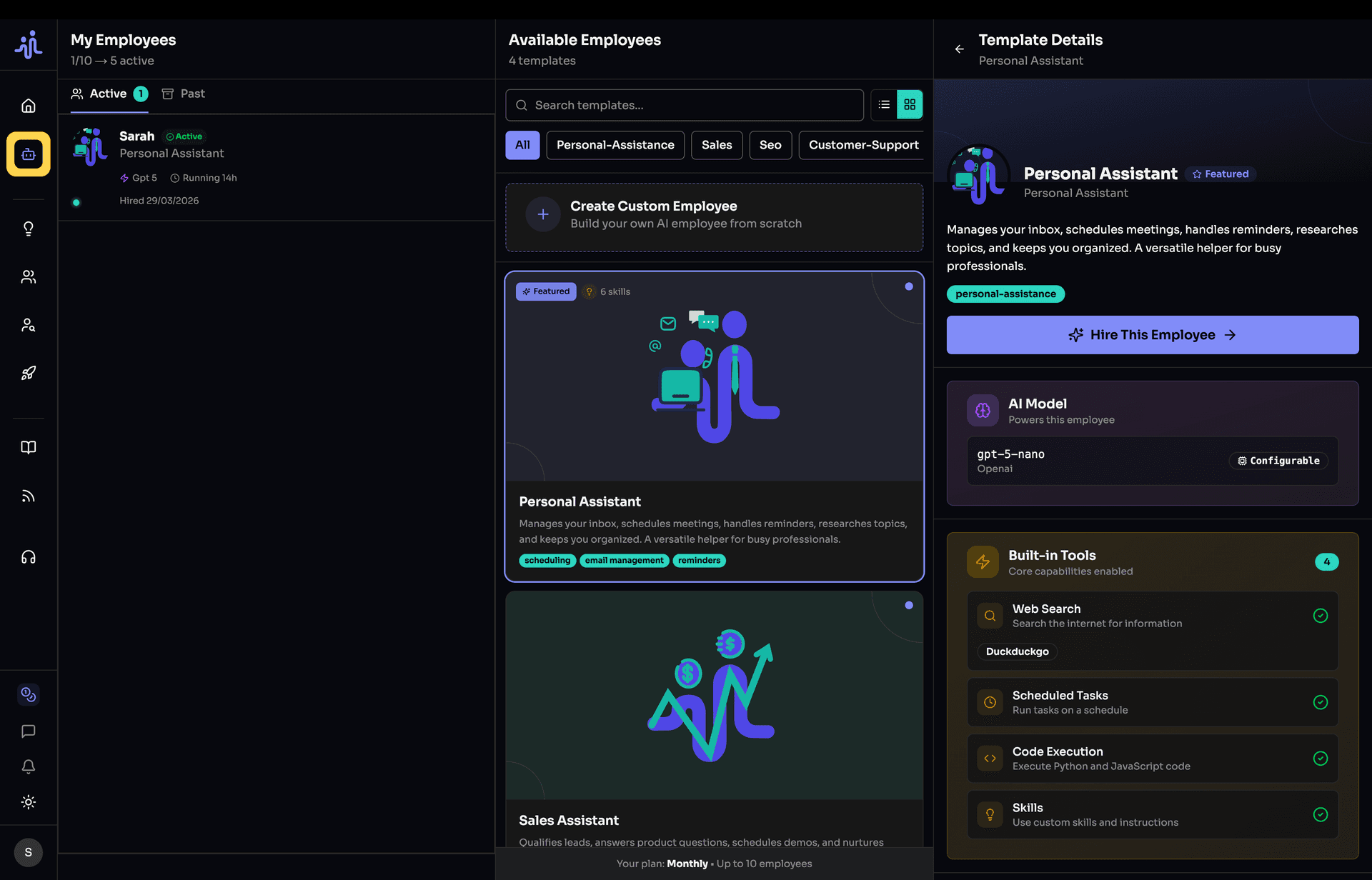
What Are AI Employees?
AI employees are autonomous agents powered by large language models (like Claude). Unlike simple chatbots, they can:
- Work continuously — Run 24/7 without breaks
- Use tools — Execute commands, search the web, connect to external services
- Communicate — Respond via Telegram, Discord, Slack, or Email
- Learn skills — Follow custom instructions and workflows
- Access files — Work with documents in their own workspace
- Integrate with MCP — Connect to any service via Model Context Protocol
Use Cases
Customer Support
Automate responses to common questions, handle tickets, and escalate complex issues to humans.
Research & Analysis
Gather market data, analyze competitors, summarize findings, and create reports.
Content Creation
Write blog posts, social media content, newsletters, and marketing copy.
Technical Assistance
Help with code reviews, documentation, debugging, and technical Q&A.
Personal Assistant
Schedule reminders, draft emails, organize tasks, and manage information.
Sales & Marketing
Qualify leads, follow up with prospects, draft proposals, and nurture campaigns.
| Employee Type | What They Do | Best Channels |
|---|---|---|
| Customer Support | Answer FAQs, handle tickets, escalate issues | Telegram, Discord, Email |
| Research Assistant | Gather data, analyze, summarize findings | Telegram, Slack |
| Content Creator | Write posts, newsletters, copy | Email, Slack |
| Technical Assistant | Code help, docs, debugging | Discord, Slack |
| Personal Assistant | Tasks, reminders, emails | Telegram |
| Sales Assistant | Leads, follow-ups, proposals | Email, Slack |
How It Works
Architecture Overview
┌─────────────────────────────────────────────────────────────────┐
│                       YOUR AI EMPLOYEE                          │
├─────────────────────────────────────────────────────────────────┤
│                                                                 │
│  ┌──────────────┐  ┌──────────────┐  ┌──────────────┐           │
│  │    Model     │  │ Built-in     │  │    Skills    │           │
│  │   (Claude)   │  │   Tools      │  │  (Custom)    │           │
│  │              │  │ Web, Exec,   │  │              │           │
│  │              │  │   Cron       │  │              │           │
│  └──────────────┘  └──────────────┘  └──────────────┘           │
│                                                                 │
│  ┌──────────────────────────────────────────────────────────┐   │
│  │                    MCP SERVERS                           │   │
│  │   GitHub  |  Notion  |  Slack  |  Database  |  Custom    │   │
│  └──────────────────────────────────────────────────────────┘   │
│                                                                 │
│  ┌──────────────────────────────────────────────────────────┐   │
│  │               COMMUNICATION CHANNELS                     │   │
│  │     Telegram  |  Discord  |  Slack  |  Email             │   │
│  └──────────────────────────────────────────────────────────┘   │
│                                                                 │
│  ┌──────────────────────────────────────────────────────────┐   │
│  │                      WORKSPACE                           │   │
│  │              Files, Documents, Memory                    │   │
│  └──────────────────────────────────────────────────────────┘   │
│                                                                 │
└─────────────────────────────────────────────────────────────────┘
Key Components
| Component | Description |
|---|---|
| Model | The AI brain (Claude) that processes requests |
| Built-in Tools | Web search, command execution, scheduled tasks |
| MCP Servers | Connections to external services (GitHub, Notion, etc.) |
| Skills | Markdown instructions defining behavior |
| Channels | How users communicate (Telegram, Discord, Slack, Email) |
| Workspace | File storage for documents and outputs |
Employee Lifecycle
Status States
| Status | Description | What You Can Do |
|---|---|---|
| Provisioning | Container being set up (~30-60 seconds) | Wait |
| Running | Active and responding to messages | Use, Pause, Edit |
| Paused | Temporarily stopped | Resume, Edit, Terminate |
| Failed | Error occurred during setup | Retry, Edit |
| Terminated | Shut down | Rehire from Past Employees |
Typical Flow
Hire → Provisioning → Running ←→ Paused
                        ↓
                   Terminated
                        ↓
              Past Employees (rehirable)
Requirements
Subscription Requirements
| Requirement | Details |
|---|---|
| Paid subscription | Free tier doesn't include employee slots |
| Available slots | Each employee uses one slot |
Configuration Requirements
| Requirement | Details |
|---|---|
| At least one channel | Telegram, Discord, Slack, WhatsApp, or Email |
| Configured tools | MCP tools need their API keys set up |
Employee Slots
Your subscription determines how many employees you can have active simultaneously. When subscribing, you choose how many employee slots you need (1-10).
Employee slots shown in billing settings
| Subscription | Employee Slots |
|---|---|
| Free | 0 |
| Pro Monthly | 1-10 (you choose) |
| Pro Yearly | 1-10 (you choose) |
Note: You can adjust your employee count anytime through billing settings. Increases take effect immediately; decreases apply at your next billing cycle.
Templates
Templates are pre-configured employee setups that give you a head start.
Browse available templates when hiring
What Templates Include
- Model selection — Pre-selected AI model
- Channel suggestions — Recommended communication channels
- Built-in tools — Essential tools enabled
- MCP integrations — Relevant marketplace tools
- Skills — Pre-written instructions and knowledge
Using Templates
- Browse available templates by category
- Review what's included
- Select template to start hiring
- Customize as needed
- Complete hiring process
Cost & Billing
How Pricing Works
Each employee slot costs $20/month and includes AI credits for your employee's usage.
| Item | Details |
|---|---|
| Per Employee | $20/month |
| AI Credits Included | ~16 million tokens ($20 worth) |
| Credits Reset | Each billing cycle |
Cost Optimization Tips
- Monitor token usage — Check your employee dashboard regularly
- Use efficient prompts — Shorter conversations use fewer tokens
- Choose appropriate models — Smaller models use fewer tokens per response
Security & Privacy
Isolation
Each employee runs in its own isolated container:
- Cannot access your local system
- Cannot see other employees' data
- Workspace is private to that employee
Credential Security
- API keys stored encrypted in Security Vault
- Secrets referenced by ID, not value
- No sensitive data in logs
Data Handling
- Conversations stored securely
- Workspace files encrypted
- You control data retention
Getting Started
Ready to hire your first AI employee?
- Hiring Your First Employee — Step-by-step hiring guide
- Configuring Your Employee — Deep dive into settings
- Employee Channels — Set up communication
- Tools, MCP Servers & Skills — Extend capabilities
Key Concepts Reference
| Term | Definition |
|---|---|
| Template | Pre-configured employee setup |
| Channel | Communication method (Telegram, Discord, Slack, Email) |
| Tool | Built-in capability (web search, exec, cron) |
| MCP Server | External service connection via Model Context Protocol |
| Skill | Custom instructions in markdown format |
| Workspace | Employee's file storage area |
| Slot | One employee capacity in your subscription |
| Provisioning | Initial setup process for new employees |
What did you think of this content?